
Is your freezer’s top shelf not freezing like it used to? You rely on your freezer to keep food fresh and safe, so when the top shelf stays warm, it can be frustrating.
You might be wondering why this is happening and how to fix it quickly before your groceries spoil. You’ll discover simple reasons behind your freezer’s top shelf not freezing and easy steps you can take to get it back to the perfect chill.
Keep reading—you’ll be saving your food and your money in no time.
Common Causes
The freezer top shelf not freezing is a common issue many face. Understanding the common causes helps fix the problem fast. Several factors can stop the top shelf from getting cold.
Some causes are simple to check and fix. Others may need a bit more care. Knowing these causes saves time and frustration.
Blocked Air Vents
Air vents let cold air flow through the freezer. Blocked vents stop cold air from reaching the top shelf. Food or ice can block these vents. Keep vents clear for even cooling.
Faulty Thermostat
The thermostat controls the freezer temperature. A broken thermostat may not cool properly. It can cause uneven temperatures inside. Testing and replacing the thermostat can help.
Dirty Condenser Coils
Condenser coils release heat from the freezer. Dirt and dust on coils reduce cooling power. Clean coils improve freezer efficiency. Use a brush or vacuum to clean them.
Door Seal Problems
Door seals keep cold air inside the freezer. Damaged or loose seals let warm air in. This raises the temperature inside. Check seals for cracks or gaps and replace if needed.
Overloading Issues
Too much food blocks air flow inside the freezer. Overloading stops cold air from reaching the top shelf. Keep some space between items for air circulation. Do not pack the freezer too full.
Credit: www.maytag.com
Quick Troubleshooting Steps
When the top shelf of your freezer stops freezing, quick steps can help fix it fast. Start with simple checks to find the problem. These easy tips save time and prevent costly repairs.
Check And Clear Vents
Cold air flows through vents inside the freezer. Blocked vents stop air from reaching the top shelf. Check for food or ice blocking the vents. Clear any obstacles to restore airflow. Good airflow keeps all freezer areas cold.
Adjust Temperature Settings
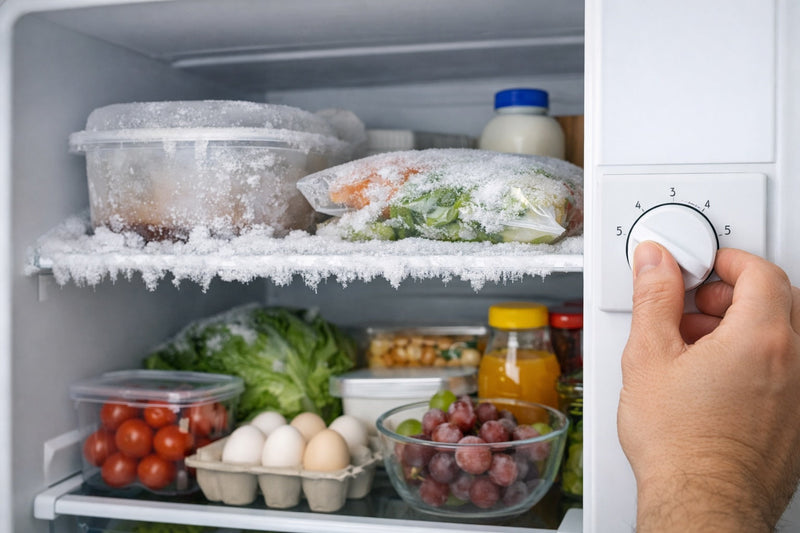
The freezer might be set too warm. Check the temperature control dial or digital setting. Set the freezer to 0°F (-18°C) for proper freezing. Wait a few hours and check if the top shelf cools down.
Clean Condenser Coils
Dirty condenser coils reduce freezer cooling power. Find coils behind or under the freezer. Use a vacuum or brush to remove dust and dirt. Clean coils help the freezer work better and keep cold air flowing.
Inspect Door Gasket
The door gasket seals cold air inside the freezer. Check the gasket for cracks or dirt. Clean it with warm water and mild soap. Replace the gasket if it is damaged. A good seal stops warm air from entering.
Rearrange Items For Airflow
Overpacked shelves block cold air circulation. Move items away from vents and avoid blocking air paths. Leave space between items to allow cold air to flow freely. Proper airflow helps the top shelf freeze evenly.
When To Defrost
Knowing when to defrost your freezer top shelf is key to keeping it cold. Frost buildup blocks cold air and stops freezing. Regular checks help you avoid this problem. Catching frost early saves time and energy. It also keeps food fresh and safe.
Signs Of Frost Buildup
Look for thick ice layers on the freezer walls or shelves. Food might feel soft or not frozen fully. The freezer may run longer than usual. You might notice water pooling inside. Frost can appear as white, dusty ice patches. These signs mean it is time to defrost.
Manual Defrost Techniques
Turn off and unplug the freezer first. Remove all food and store it safely. Leave the door open to let ice melt naturally. Use towels to catch dripping water. Avoid sharp tools to chip away ice. Wiping down with a cloth helps remove leftover moisture. This method is simple and effective for frost removal.
Using Defrost Mode
Many freezers have a built-in defrost mode. Check your manual for instructions. Activate the mode and keep the door closed. The freezer will heat slightly to melt ice. This mode saves effort and protects the appliance. Wait until the cycle finishes before refilling the freezer.
Credit: homeappliancecare.com
Maintenance Tips
Maintaining your freezer helps keep the top shelf cold and working well. Simple care steps stop many common problems. Follow these tips to keep your freezer in good shape and avoid freezing issues.
Regular Cleaning Schedule
Clean your freezer every few months. Remove all food items first. Use a mix of warm water and mild soap. Wipe down shelves, walls, and door seals. Dry everything well before putting food back. Cleaning stops frost buildup and keeps air flowing.
Proper Loading Practices
Do not overload the freezer. Leave space for air to move around. Avoid blocking vents on the top shelf. Arrange items so cold air reaches all parts. Proper loading helps maintain even temperature and stops warm spots.
Seal Replacement Advice
Check door seals often for cracks or tears. A broken seal lets cold air escape. Replace damaged seals quickly. Use a seal that fits your freezer model. Good seals keep cold air inside and save energy.
When To Call A Technician
Knowing when to call a technician is important for freezer problems. Some issues need expert help to avoid bigger damage. Quick action can save money and keep food safe.
Persistent Temperature Issues
When the top shelf stays warm for days, it signals a problem. Adjusting the thermostat does not fix it. The freezer might have a broken sensor or a blocked vent. A technician can find the exact cause and fix it properly.
Unusual Noises
Loud humming, clicking, or buzzing sounds are not normal. These noises can mean the fan or motor is failing. Ignoring sounds can lead to a full breakdown. A professional can diagnose and stop the noise quickly.
Compressor Problems
The compressor is the heart of the freezer. If it runs nonstop or not at all, cooling suffers. Signs include warm air and high energy bills. Only a trained technician can repair or replace the compressor safely.
Credit: www.homedepot.com
Frequently Asked Questions
Why Is My Freezer Top Shelf Not Freezing Properly?
The top shelf may not freeze due to poor air circulation or blocked vents. Check if items are blocking airflow or if the fan is working. Also, ensure the temperature setting is correct and the door seals tightly.
How To Fix A Freezer Top Shelf That Won’t Freeze?
Start by cleaning vents and removing obstructions. Check the thermostat settings and adjust if needed. Defrost the freezer if ice buildup blocks airflow. If problems persist, inspect the fan motor or call a professional technician.
Can A Faulty Door Seal Cause Freezer Top Shelf Issues?
Yes, a damaged or loose door seal lets warm air in. This raises the temperature and prevents proper freezing. Inspect the seal for cracks or gaps and replace it if necessary to maintain optimal cooling.
Does Freezer Overload Affect The Top Shelf Freezing?
Overloading the freezer restricts airflow, causing uneven cooling. The top shelf may not freeze well if airflow is blocked. Organize items to allow air circulation and avoid packing the freezer too tightly.
Conclusion
A freezer top shelf not freezing can be frustrating. Check the temperature settings first. Make sure air vents are clear and not blocked. Avoid overpacking the freezer to allow good air flow. Clean the condenser coils regularly for better cooling.
Defrost the freezer if ice buildup occurs. Small fixes often solve the problem quickly. Stay patient and follow these simple steps. Your freezer can work well again soon. Keep food safe with a properly freezing top shelf.